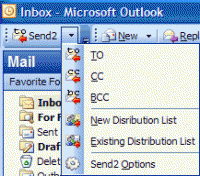
Microsoft Outlook integrated plug-in. Create distribution list and send bulk e-mail to recipients from selected folders, e-mails, contacts, meetings, or tasks in one click. Add contacts to Distribution list that already exists. Time-saving tool.
The Send2 plug-in extends standard Microsoft Outlook functionality.
Usually, sending mass e-mails and distribution lists management takes a great deal of your time. Having e-mails in your folder, you can only reply to an e-mail or forward an e-mail. Send2 allows you to easily create a new e-mail message in response to multiple messages. Or, when you create a new message, you need to type in an address or select a contact (distribution list) after clicking the To... (Cc...) button. With the help of Send2, you can create new distribution lists and add new recipients to existing ones, picking up contacts right from the current folder.
Features:
Create distribution list and send bulk e-mail to recipients by pulling out them from selected Microsoft Outlook folders, e-mails, contacts, meetings, or tasks in one click. Plug-in integrated in Microsoft Outlook actions menu, shortcut menu, into toolbar, and right-click item menu. Add recipients to Distribution list that already exists. Add recipients from selected Outlook items or any entire folder to a new e-mail "To", "CC", or "BCC" field in one click. Feature for personalizing group e-mails - It allows you to insert the appropriate contact details - Full Name, First Name, Middle Name, Last Name, Initials, Nickname and Company - for each recipient of a group message. "Send personally" feature - The final recipient will receive no information about any of the other recipients. Recipient will see only his/her name and address in the "To" "CC", "BCC" fields (a field of your choice), as if the message has been sent to him/her only. The Send2 Options allow you to automatically flag the unsent group messages, and remove flags when these messages are sent out. Easy customizable options. Time-saving tool for routine tasks. Support for Outlook 2002, 2003, 2007, 2010
Whats new in version 1.41:
Performance improvements, minor issues and bug fixes.
Requirements:
Microsoft Outlook version XP/2002, 2003/2007/2010
Operating system:
WinXP,WinVista,WinVista x64,Win7 x32,Win7 x64,Win2000,Windows2000,Windows2003,WinServer,Windows Vista Ultimate,Windows Vista Ultimate x64,Win98,WinME,Windows Tablet PC Edition 2005,Windows Media Cente
Limitations:
20 runs and 10 items per try
Release notes:
Major Update

This FREE software verifies / validates email addresses in a list, removes invalid entries and clean the list. Performs three levels of verification with a high speed multithreaded engine. Use this tool first before sending emails to a huge list.
Price: $0, Rating: 1.09, Downloads: 124
Download

LoneMail Taskmaster2006 is a program that is designed to help you manage links and e-mail lists. Can edit, add items to the list, remove items from the lists and filter the lists according to specific criteria. you can compare lists, merge and verify
Price: $30, Rating: 8, Downloads: 102
Download
a software package that is specifically designed to help you collect business contacts e-mails from the web and local files automatically. Also, it helps you organize these contacts in lists and verify these emails, making sure they?re all valid
Price: $100, Rating: 7, Downloads: 93
Download
LoneMail Collector is a part of LoneMail Suite 2006. It collects e-mails online.
LoneMail Collector starts by scanning web addresses you specify. Then, it follows hyperlinks to other pages. During which it collects any any e-mail address
Price: $60, Rating: 9, Downloads: 68
Download

Email Verifier Professional quickly and easily verifies email addresses. Email Verfier removes invalid, not existed and dupicate emails. Email Verifier is designed for users who have their own mailing lists and want to keep them up-to-date.
Price: $0, Rating: 8, Downloads: 53
Download 
 Send2 for Outlook 1.41 details